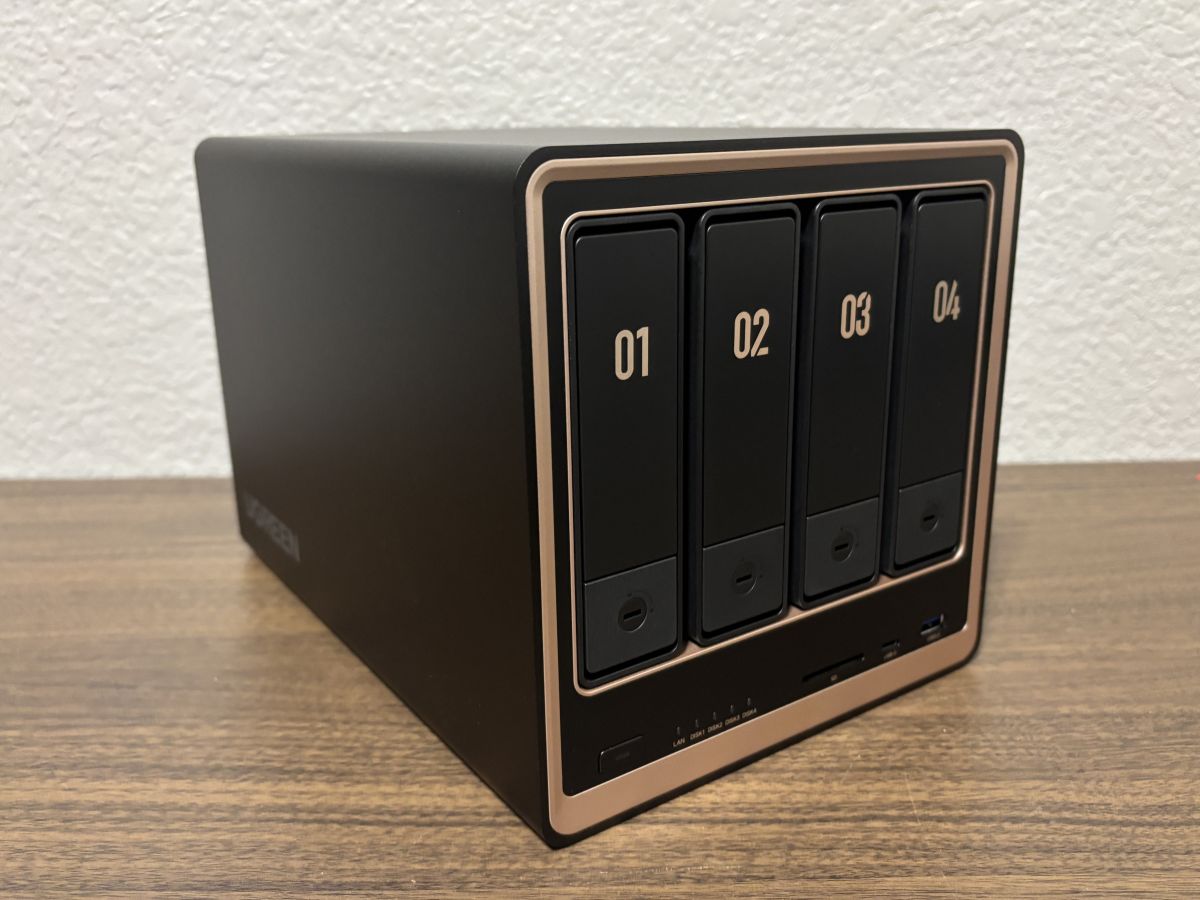
I first became aware of network-attached storage or NAS several years ago. My brother wanted to be able to access his extensive movie collection digitally as well as share it with our family. For his COVID project, he set up an NAS. While I have experience with computers, I have never really been involved with setting up and maintaining networks. Therefore, I never thought about setting up my own NAS. However, I have learned that an NAS is fairly easy to setup and use thanks to UGREEN, a company whose products I have reviewed in the past and continue to use with great reliability. UGREEN has unveiled a new line of NAS (network-attached storage) devices and their DXP4800 GT NAS offers users the ability to store their files locally and still be able to access them online.
What is the UGREEN DXP4800 GT NAS?
Network-attached storage is a dedicated file storage solution that connects to a local area network (LAN), allowing multiple users and devices to access and share files seamlessly. It combines hardware and software with protocols like NFS, SMB, or AFP to enable centralized file sharing. NAS devices, which can be scaled up by adding more storage drives, often support redundant storage configurations like RAID for data integrity. Managed through a browser-based utility, NAS systems provide fast, secure, and reliable storage services, making them ideal for both home and enterprise environments where efficient file sharing and data management are crucial.
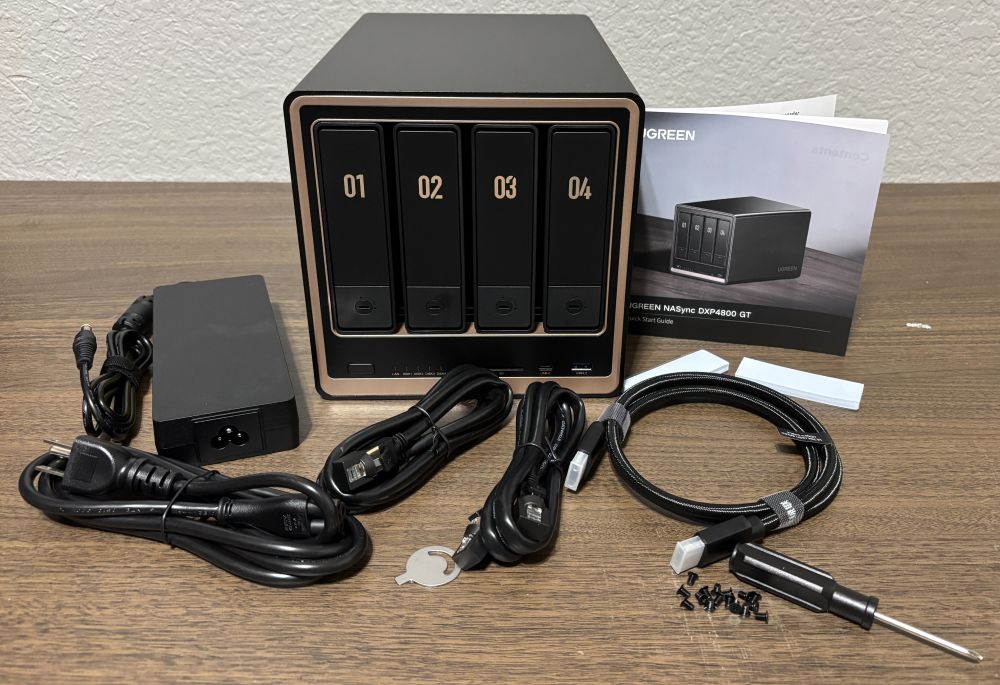
The UGREEN DXP4800 GT NAS is about 10 inches long, 7 inches wide, and 7 inches high. It includes the device, a small screwdriver and screws, a power adapter, 2 hard drive tray keys, 2 SSD thermal pads, 1 HDMI cable, and 2 CAT7 ethernet cables. It also has the following ports and bays built into it:
- 1 USB-C 3.2 Gen2 (front)
- 1 USB 3.2 Gen 2 (front)
- 1 SD 3.0 card slot (front)
- 1 HDMI 4K (back)
- 1 USB 3.2 Gen 2 (back)
- 2 USB 2.0 (back)
- 2 10GbE ethernet ports 312.5 MB/s (back)
- 4 SATA bays
- 2 M.2 SSD drive slots

Powered by a 4-core, 8-thread AMD Ryzen embedded R2514 processor, the system is designed for continuous use with stable performance under sustained workloads. It features 8GB DDR4 4800MHz RAM and is upgradable to 64GB. With all this power, the DXP4800 GT uses a hydraulic fan that is quiet at only 29-34 dB. The device also includes a magnetic dust mesh filter that attaches to the back over the fan to prevent dust and hair buildup. It can be easily removed and cleaned.

The DXP4800 GT does not include any storage discs. However, each of the 4 bays can take up to a 30TB SATA drive and each SSD slot can accommodate an 8TB SSD drive for a maximum of 144TB of storage. NAS-specific hard drives are recommended such as the Western Digital Red or Seagate Iron Wolf. The UGREEN DXP4800 GT NAS is available from the UGREEN store on Amazon and sells for $699.99. It is also available directly from UGREEN’s website where it is currently on sale for only $659.99.
Using the UGREEN DXP4800 GT NAS
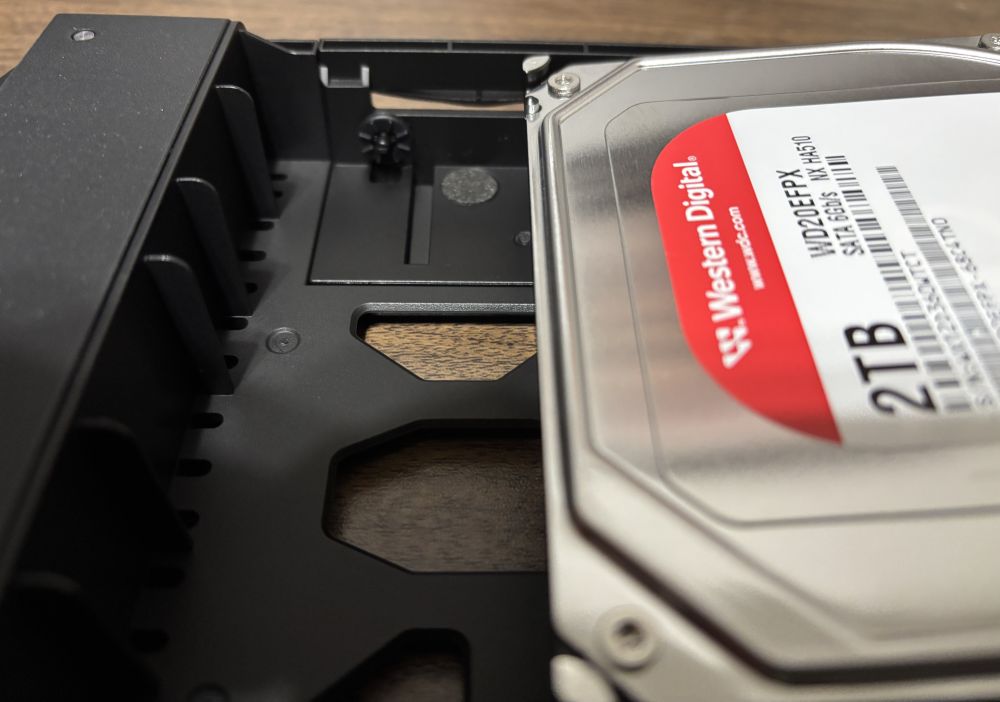
Last year I set up my first NAS with the UGREEN DH4300 Plus. It was a learning experience However, I found it very easy to setup the DXP4800 GT. The first step is to remove the hard drive trays by pressing on the lock pad and then pulling up on the tray lever to remove each tray. After removing the four trays, place a 3.5″ hard drive into each tray and snap it in using the built in studs. For 2.5″ hard drives, secure them with four screws. Once this is done, return the trays with the hard drives to the DXP4800 GT and snap them in so that the connections on each hard drive fits into the slots. After pushing in the levers and using the tray keys to lock them into place, connect the device to the LAN by plugging the included ethernet cable to your router and connect the power cable. Press the power button to turn on the device.
To interact with the NAS device, you can connect to it using a browser or an app available from the UGREEN website. I downloaded UGREEN NAS app from the Apple App Store. It is also available for Android. For the initial setup, the phone or computer must be connected to the same router network at the DXP4800 GT. The app shows you the hard drives that have been installed and walks the user through the process of setting up the NAS. This includes providing information on the different RAID types are available for the installed drives as well as the amount of memory that will be available and the amount of data protection provided. Once this is selected, the NAS device will begin formatting the drives and setting up the RAID system. This can take many hours depending on the type of protocol selected and the size of the storage on the hard drives. Once setup, the DXP4800 GT can be accessed with either the app or with a browser. The app features a variety of internal apps within it for organizing the data. For example, the Photos app lets users organize their photos while the Theater app does the same with videos. Users can create their own folders and then begin uploading files to the NAS device. Once they are uploaded, they can then be accessed remotely using the main app or browser.

The app also provides the ability to setup security for the device as well as setup strong permission controls for private folders for each family member while also allowing easy sharing of files. Users can also setup 2FA identify verification with a one-time passcode to keep our data safe even if your password is compromised.
Why You Should Get the UGREEN DXP4800 GT NAS
As I mentioned earlier, I have used several different products by UGREEN and have always been impressed with their quality. UGREEN is quickly gaining popularity within the NAS market and have several NAS devices available with different capabilities and maximum amounts of storage. My family takes a lot of photos with our phones and they are all stored on iCloud. However, it is costing us $9.99 per month for only 2 TB of storage. I also store things on my Google drive which also runs $9.99 for 2TB per month. For just those 4TB of storage, I am paying about $240 per year. For 6TB or 12 TB of storage on iCloud, one can pay $360 or $720 annually respectively. Therefore, I set up the NAS for my family so that we can share photos and videos which is important when you have adult children who have families of their own. When I had an opportunity to test out UGREEN’s latest product, I was eager to try the DXP4800 GT. I set it up with four 2TB 3.5 SATA hard drives. Four hard drives provides more options for the RAID setup as well as providing more total memory.

While in the past I was a bit apprehensive about setting up the system, I found it was much easier than I expected. The app on my phone did a great job walking me through the process and the UGREEN website provided useful information in greater detail than found on the app. After deciding on a RAID type, the app directed the NAS device to begin formatting and setting up the hard drives. The entire process took over several hours. I let it run overnight and it was ready by the morning. Once that was accomplished, I created some new folders and then tested uploading photos. This was extremely easy. I just selected the Favorites category from Photos on my iPhone and over 1,000 photos began uploading directly from the iCloud without having to be downloaded to my phone and then up to the NAS. I also uploaded some movies and videos and was able to access them from the Theatre app.

I have been using the UGREEN DXP4800 GT NAS for a few weeks and have been very impressed. It was very easy to install the hard drives and set up a storage pool. I appreciated the information provided within the app as well as through the UGREEN site which offers great details on not only using their products but also about NAS in general. I used the app on my smart phone to set up the DXP4800 GT NAS and liked how the app explained the various RAID types so I could determine which would be most appropriate for my needs. I was also able to easily upload photos, videos, and other files seamlessly using both the phone and computer apps provided by UGREEN. Since my daughter needed storage for videos and photos she uses for her business, I was able to create folders on the NAS she could access from her phone or laptop to save her money for cloud storage. She was impressed at how easy it was to upload photos and videos and then access them as needed.
UGREEN’s NAS software, which you can install on the NAS via your phone, laptop or browser, offers a variety of tools. The Photo, Music, and Theater apps allow you to easily access these types of media which you have uploaded to your NAS. Docker and Home Assistant allow you to control your connected devices on the LAN to which your NAS is connected. Surveillance Center allows you to store footage from your connected cameras right onto your NAS rather than having to store them on a paid server. Each of these apps can be installed form the App Center
Whether you are a veteran looking to upgrade or expand your NAS usage or someone looking to create an NAS for the first time, I highly recommend the UGREEN DXP4800 GT NAS. It combines quality with ease of use and functionality while saving me money on cloud storage subscriptions.
For more information on the UGREEN DXP4800 GT NAS, check out the UGREEN website.
Here is a video about the UGREEN DXP GT lineup.
Disclosure: GeekDad received samples of these items for review purposes.
Michael Knight

Michael teaches high school classes in Science, History, and Computer Science including Game Design. He is the father of six with ages ranging from 27 to 16 as well as a proud grandfather. Michael is the author of over one hundred published video game strategy guides and when not playing board games, enjoys reading and spending time with his family.