There are plenty of times–most times, in fact–when I go to bed much later than my wife. And while our house is big enough that watching TV downstairs doesn’t generally bother her upstairs, I still turn the volume down to try to be courteous. But there are times when a show or movie I’m trying to watch is itself quiet, and the low volume makes things hard to hear.
While there are plenty of solutions out there to connect Bluetooth headsets to TVs (including, potentially, through the TV itself) the MIXX SteamQ TV Bundle provides an easy and affordable way to solve this problem.
The bundle includes a pair of over-the-ear noise-cancelling headphones and, more importantly, the MIXX StreamPort.
The StreamPort describes itself as a “TV audio transmitter,” and that is exactly what it does: it transmits the audio from your TV over Bluetooth, allowing you to listen to the audio using either the headset included in the bundle or any other Bluetooth earphones or earbuds.
The StreamPort is powered via a USB-C cable, so it can easily plug into a standard wall plug, the USB ports on your power strip, or the TV itself. This later option is nice because turning the TV on or off will automatically toggle the power on the StreamPort as well, but not all TVs have powered USB plugs (although most modern ones do.)

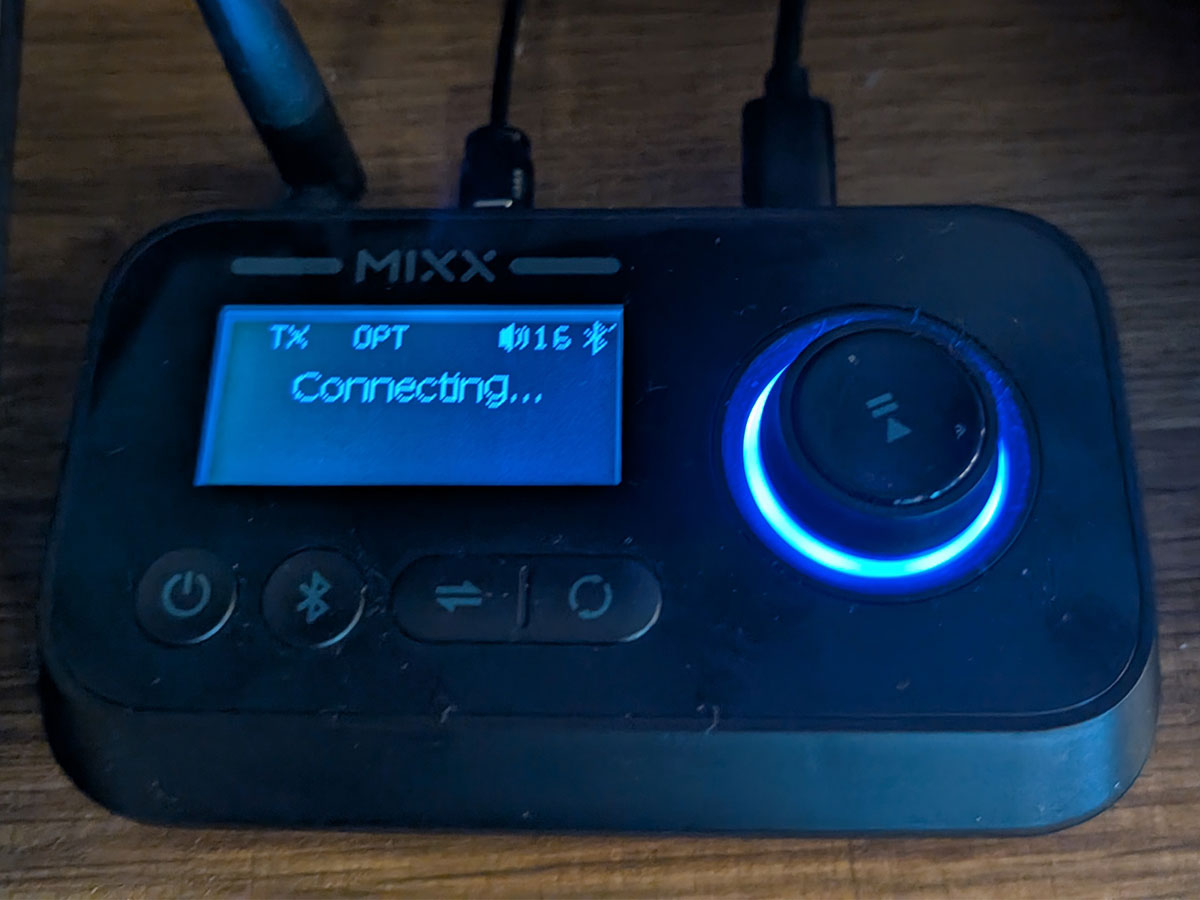
Getting audio out of the TV to the StreamPort is basically the same as getting into a home stereo system, sound bar, or whatever else you currently use. The StreamPort supports audio in via either 3.5mm AUX cables or an optical audio cable, both of which are provided. Once plugged into the TV, you can use the StreamPort’s mode button to toggle until you get the TX, or transmit, mode. Next, you put your headphones or earbuds into pairing mode, and they should appear on the StreamPort’s screen. Then, you can happily listen to whatever you want to watch at any volume you choose (but please be kind to your ears and don’t listen too loud) without disturbing anyone around you.
Setup was as easy to what I outlined above. I plugged the device into one of my TV’s available USB ports, then connected it to the TV’s sound outputs using the optical cable. I put the headphones into pairing mode and the StreamPort found them very quickly.
Honestly, the most difficult step was getting the TV to behave. I initially set the sound to Optical, but only got static; however, once I switched to Optical and Internal–where the TV would transmit the audio through both its speakers and the optical output–things worked perfectly. I simply lowered the volume on the TV to zero (my TV has an annoying “feature” where an icon constantly flashes on screen if I use the mute feature) and I was able to listen solely through the earbuds. Which, honestly, is the ideal setup anyway, since optical only would require constantly switching the TV sound mode every time I wanted to go back to listening to the TV as normal.
You might be asking yourself: ok, cool, but if my TV can connect to Bluetooth devices anyway (as mine can) why bother with the extra device? Well, the first answer to that is what I mentioned above: in order to stream the audio through a headset directly from my TV, I have to go into the TV settings and change the audio output. With the StreamPort, I don’t. But also, the StreamPort features two other modes that make it more versitle. The first is Receive Mode. With this, you can connecct your home stereo system to the StreamPort, then connect your phone via Bluetooth, and stream audio from your phone to your stereo. The third option is Bypass Mode, which combines both other modes, allowing you to use your stereo system and TV at the same time. You can also use this mode to listen to your TV through your Soundbad or other home entertainment system and through Bluetooth earbuds as well, which might be helpful if you have someone who cannot hear well enough to listen to the TV directly. They can instead listen on the headphones at whatever volume they need, while everyone else listens to the TV at a volume that is comfortable to them.
The MIXX system does not solve any one problem in a way that’s unique, but combined, all three possible modes provide solutions to multiple potential audio issues in a single, affordable box. The MIXX StreamQ TV Bundle is available at Amazon and other retailers.
NOTE: I received a review unit, but the opinions here are my own.
Rob Huddleston

Rob, GeekDad's Gaming Editor, is a technical writer for Google (provided by HCL). He is alo college professor teaching design, programming and 3D printing, watches a ridiculous number of movies, plays as many board games as he can, and loves history, from the medieval period to the technological age. He's also the Umpire-in-Chief for his local Little League, and is a Little League Certified Tournament Umpire. His kids are a 20 year old college junior and a 16 year old high school senior. (Although there's a good chance that they're older now and this just hasn't been updated.)