

Much like Home Depot did with their 12-ft Skelly this year, they’ve updated another holiday favorite, their 6.5 Ft Animated Santa, and given him app control. So what does that mean for you, and will you want to pick up this animatronic for the holidays? Read on!
What Is the 6.5 FT Animated LED App Controlled Santa?
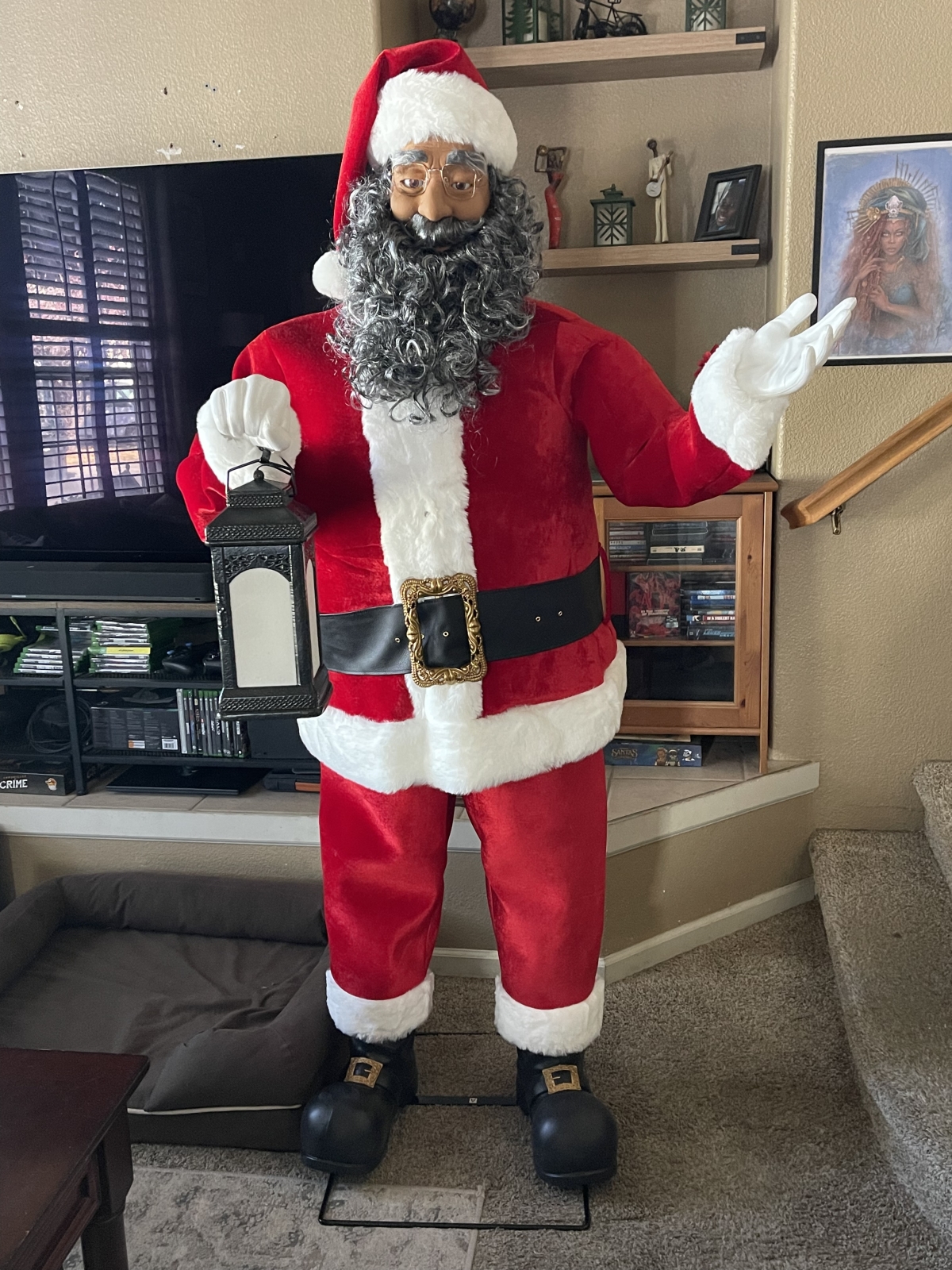
The App Controlled Santa, sold by Home Depot under their Home Accent Holidays label, is an animatronic that retails for $299 and is available in two versions: a Caucasian Santa, available here, and a Black Santa, available here. Other than a different head, both Santas are identical. Home Depot sent me the Black Santa for review.
Here are some of the features of the App Controlled Santa:
- Indoor Use Only
- Décor-Pro App integration allows a customizable Santa
- Motion sensor activated
- Personalize 30 sound recordings, or speak through “Live” mode
- Santa comes with 5 pre-recorded jolly phrases
- Servo motors allow for dynamic and fluid lifelike full body movement
- Expressive blinking eyes
- Lantern lights up with flickering warm flame effect
- Plug-in power adapter included
- 1-person assembly in 45 minutes
- Timer: 6 Hours ON / 18 Hours OFF

Assembling the 6.5 FT Animated LED App Controlled Santa
You can find assembly instructions here.
Home Depot really wants to make sure that you’ll always know how to assemble their animatronics. Not only are the instructions available online and included in the box, but the inside box lids also show you how to put together the App Controlled Santa.

Opening the box, you’ll find a Tetris-like assortment of pieces. As always with animatronics, if you’re planning on packing the prop back in the box at the end of the holiday, I strongly suggest taking multiple photos of the inside of the box as you remove pieces, to help you with fitting everything back in again.

Home Depot includes printed assembly instructions in the box, as well as a guide to using the free Décor-Pro App which will control your Santa.

As with most animatronics, you’ll assemble Santa working from the base up. First you’ll add the legs and waist. There is a mechanism in the hips that will allow for rotation of the torso.
Next up you’ll attach the torso.

There are openings in both the front and back of the torso, allowing you access to connect wires to ones running out of the control box. The wires are color-coded, making it easy to connect everything properly. There are red and white wires that run out of the hip assembly, that you’ll connect right after attaching the torso.

Next up is connecting the arms and hands. First you’ll slide the costume top over the torso, and then work the arms through the sleeves of the jacket. The arms slot into the shoulders, and hands slot into the arms.
The lantern simply hangs in a bracket under Santa’s right hand, with a cord from the lantern connecting to the matching one on the forearm.

Finally, you attach the head and its wire to the torso and control box, add the power supply, and you’re good to go.
Using the 6.5 Ft Animated LED App Controlled Santa
If you’ve got other Home Depot animatronics, the App Controlled Santa’s control box will look pretty familiar. There’s a volume control, power output, a speaker output, and an input for a step pad. There’s a mode button that will allow you to cycle through the different operations, which are:
- Bluetooth
- Lights only
- Off/Step Pad operation
- Timer/Sensor

Before we get to the Bluetooth functionality (which you’ll use with Home Depot’s app), let’s go over the other modes. Lights Only is literally just the lantern light, which emits a flickering flame. The Off/Step Pad mode keeps the App Controlled Santa off unless someone steps on the step pad, at which point it activates and performs a random phrase and motion from its memory. Turning on the Timer/Sensor mode will have the animatronic on a continual cycle with motion sensor activation for 6 hours and then off for 18 hours.
I tried out both the motion sensor and the step pad, and both worked well. I had a slight problem with the animatronic recognizing motion coming from the left side of Santa, but that’s because of an excess of fur on that side of the motion sensor, which is located in the fur lining of the jacket. I’ll probably carefully trim a bit of that fur back to improve responsiveness of the sensor.

Here’s a look at Santa in action, performing one of his 5 pre-recorded phrases:
Here’s another pre-recorded phrase, but close up so that you can see all the detail and movement in Santa’s face:
Using the Décor-Pro App
The Décor-Pro App is a free app that allows you to customize your app controlled animatronics. I was already somewhat familiar with using the app as I’d picked up the 6.5 FT App Controlled Skeleton last Halloween.
To use the app, you switch the App Controlled Santa to Bluetooth mode and then launch the app. The app will show the animatronic, allowing you to add it. Once you’ve done that and also connected your phone’s Bluetooth to the App Controlled Santa, you’re ready to customize your animatronic.
After selecting Santa in the app, you’ll see the current pre-recorded phrases, as well as an option to “Create Your Own Sound” at the top.

When you select “Create Your Own Sound,” you can then create your own sound recording. After saving the recording, you’ll have the option to alter the voice, as well as add background sounds. You can also change the color and qualities of the lantern light, and choose to have only a select few motions of the App Controlled Santa if you want.

You unfortunately can’t radically change the motion of the animatronic, only select which parts of the pre-programmed motions you want.
You can check out your custom phrase at any time in the app by pressing the play button with the phrase selected. Once you’re happy with your creation(s), you can then select exactly which phrases you want Santa to say, and the app will update the animatronic. At that point, you can switch over to step pad or sensor mode, and whichever phrases you’ve chosen, along with their motion and light choices, will play when Santa activates.
Here’s an example, where I recorded myself speaking some familiar lines from a famous play:
Here’s another, with some decidedly non-Christmas music:
And here’s one more, where you can see one of several possible voice alterations in play:
Live Mode in the Décor-Pro App
Finally, you have the option to press the “Live” button while in Bluetooth mode to control the App Controlled Santa directly. You speak into your phone’s microphone, and Santa speaks your words, the mouth syncing up. I unfortunately don’t have any video of this, as I use the same phone to shoot videos as I do to run the app. However, this feature worked pretty flawlessly for me, as long as I stayed in Bluetooth range. Last year the feature didn’t work as well with the App Controlled Skeleton, so I can only imagine that they’ve improved the Décor-Pro App since October.
6.5 FT Animated LED App Controlled Santa – Final Thoughts
Even if they hadn’t added the app control, the LED App Controlled Santa is a great animatronic. He comes with 5 diverse and very Christmas-y pre-recorded phrases, which randomly play when activated with either the motion sensor or the foot pad.
The appearance of this Santa is very pleasing to the eye. The clothing is done very well, and fits great on the animatronic. The legs even give an illusion of thickness, even though they simply hang off the ring that defines the waist. The face sculpt on both Santas is warm and friendly, with nice paint applications and luxurious beards.

The animatronic has great movement, thanks to some servo motors in the head as well as motion in the left arm and waist. My girlfriend was especially impressed with the lifelike blinking of Santa’s eyes. I wish that you could choose to have a little more variety in the movement of the body, but there’s still a very lifelike quality you get from the App Controlled Santa.
It’s the addition of the Décor-Pro App that brings the App Controlled Santa up to a whole new level. The ability to add up to 30 of your own sound recordings is probably more than you will ever need, but it allows you to create a custom experience with your animatronic. You could have Santa greet your relatives and friends by name, making their visit to your home a unique experience.
The Live feature brings things up yet another notch, as you can use it to directly interact with people. The only downsides are that you would need to be close enough to the animatronic that the Bluetooth connects, but far enough away that you don’t ruin the illusion of Santa actually speaking with visitors. Plus you also need a way to see and hear people interacting with the animatronic. If you had the App Controlled Santa on your porch, you could probably use a Ring camera or some other security camera for that purpose.
Overall, I think that the 6.5 FT Animated LED App Controlled Santa is an excellent centerpiece to your holiday decorating. A Santa Claus often becomes the focal point of Christmas decor, and having a lifesize Santa with great movement and sound really helps bring the holidays to life. The options to customize the animatronic brings a lot of variety and longevity to your Christmas display, and he’ll even look great just as a static prop with the lantern lit up. And kudos to Home Depot for offering two different versions of the App Controlled Santa, to allow for a more ethnically diverse celebration of Christmas.
For more information or to make a purchase, head to your local Home Depot or the Home Depot website.
Home Depot provided this prop for evaluation, but had no input into this review.

Paul Benson

Paul is a comic book writer, screenwriter, an avid board and tabletop gamer, reader of comics and collector of statues and figures. He is the creator of the webcomic "Heroines for Hire" and co-writer of "Disaster!: The Movie." He currently writes "E.I.: Earth Invasion" for Wunderman Comics.

