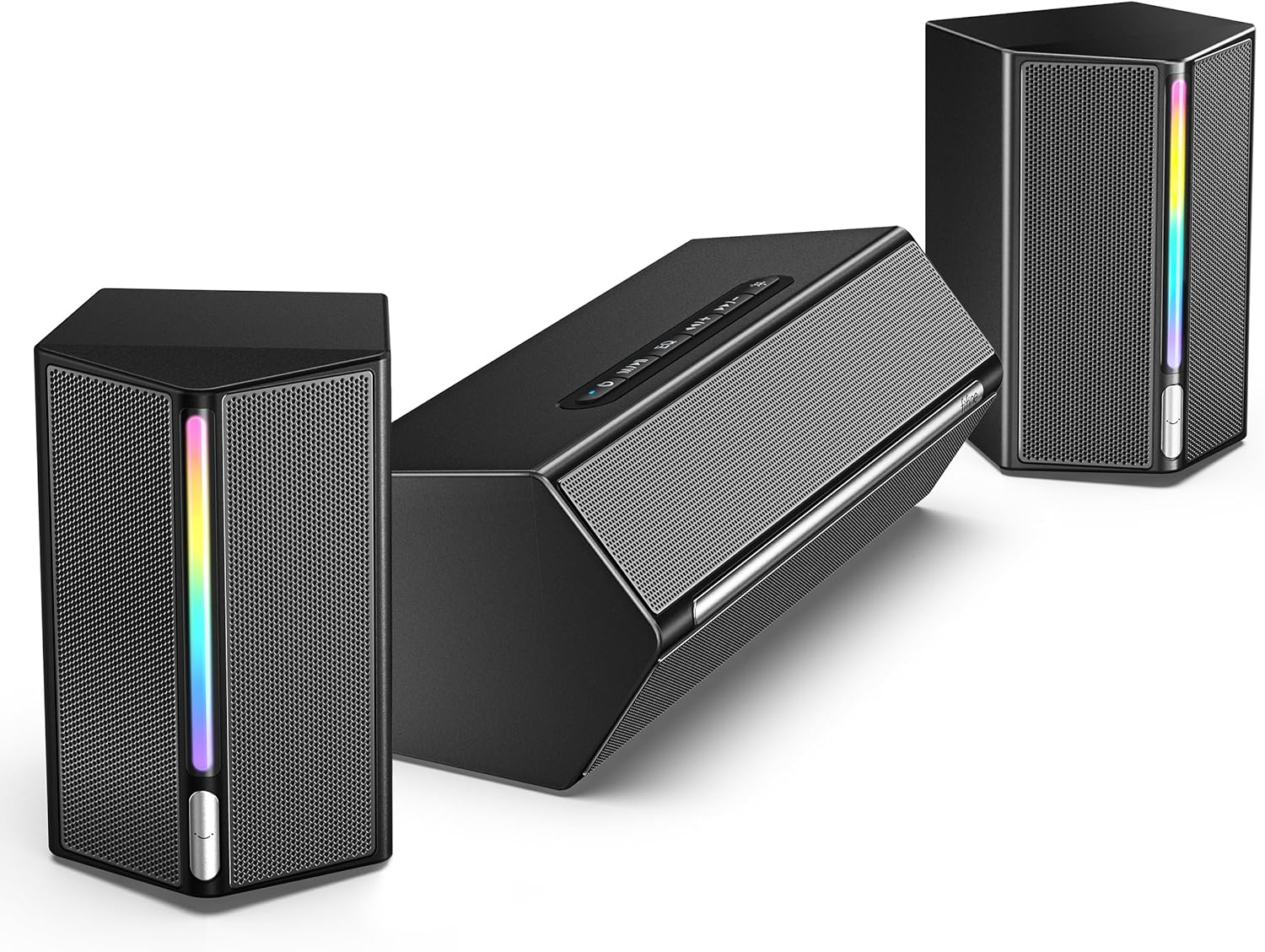
I wasn’t initially familiar with relative audio industry newcomer Fifine Microphone, but, after looking at a number of positive impressions online, I was excited to see what their Ampligame A22 speaker system had to offer. What I found was a flexible, affordable audio solution that might be just what you’re searching for if you’re currently sending an older kid off for their first semester of college life.
On the surface, the A22 seems like just another set of mid-range 2.1 stereo speakers. The hexagonally shaped left and right shelf-style satellites look smart enough in the production photos, as does the horizontal subwoofer, which lacks the RGB lighting found on the satellite speakers and instead has a top-mounted array of control buttons.
At the very least, I figured this would prove a solid new set of speakers for the family gaming PC, but as soon as the shipping box arrived, I began to suspect I was in for a treat.

Proper packaging goes a long way in my house, and the Fifine Ampligame arrived in a manner far surpassing my expectations for a $75-ish speaker setup. All the components were safely nestled inside a single cardboard box between a pair of custom foam inserts. Nothing had shifted or been at all damaged in transit, and this was accomplished without any other extraneous packing materials.
There were no individual nested boxes or crunchy cellophane wrappers. In fact, aside from some twist ties on the cabling, the box and inserts were all the packaging to speak of. This meant that unboxing, setup, and, yes, splitting up said packaging for recycling was dead simple. (Luxury brands, take note—this is how you properly present your product to a new consumer.)
Out of the box, the A22 has practically everything you need to take advantage of its various audio interface features. Simply connect both speakers to the subwoofer with the included USB-C to USB-C cables—which have nice little notches in them to help hold things in place—then connect the subwoofer to the power supply and plug in.
From there I continued my review in the most pedestrian fashion; I connected the A22’s auxiliary input of the subwoofer to the audio output of the PC and was off to the races. A long press of the power button brought the system to life complete with a few flashes of the integrated RGB lighting.
The A22 offers a trio of preset sound profiles you can cycle through using the EQ button: the balanced Game, the brassier Movie, and the bassier Music. I tend to default to a single EQ rather than constantly switching things up, and while the music profile is usually my go-to I actually found Fifine’s movie setting to have better sound overall.
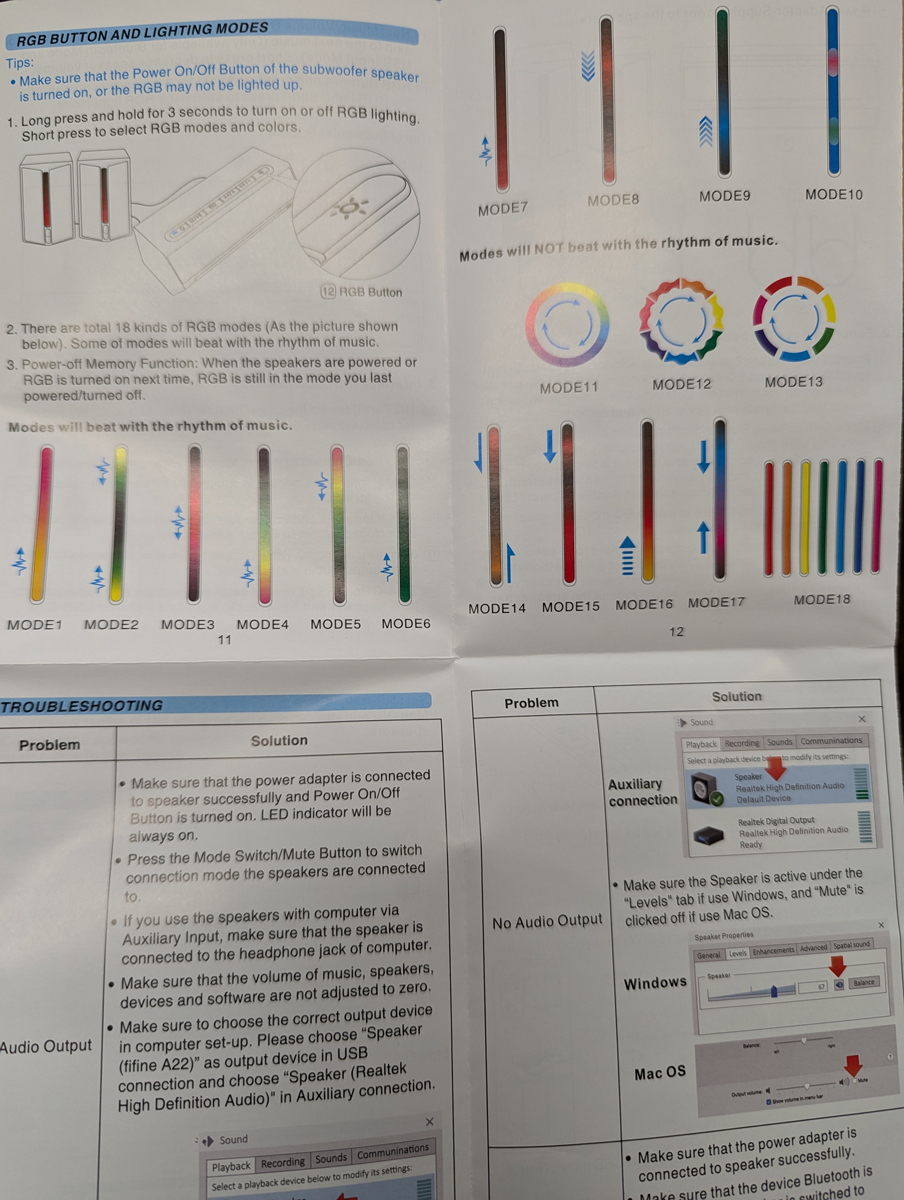
A dedicated RGB button can be used to turn on and off the lights on the satellite speakers via a long press, while a short press cycles through various colors and patterns. My favorite was a dark red lighting scheme that responded to my gaming audio (mode 3), but if your keyboard and mouse use single- or rainbow-hued lighting, you can likely find a pretty solid match for your speakers as well in its suite of 18 different modes.
My only real knock against the basic controls are the hybrid volume up/next track and volume down/previous track buttons. Yeah, they’re combined. A short press simply increases or decreases the audio, while a long press changes the music track… but only if you’re in USB or Bluetooth mode.
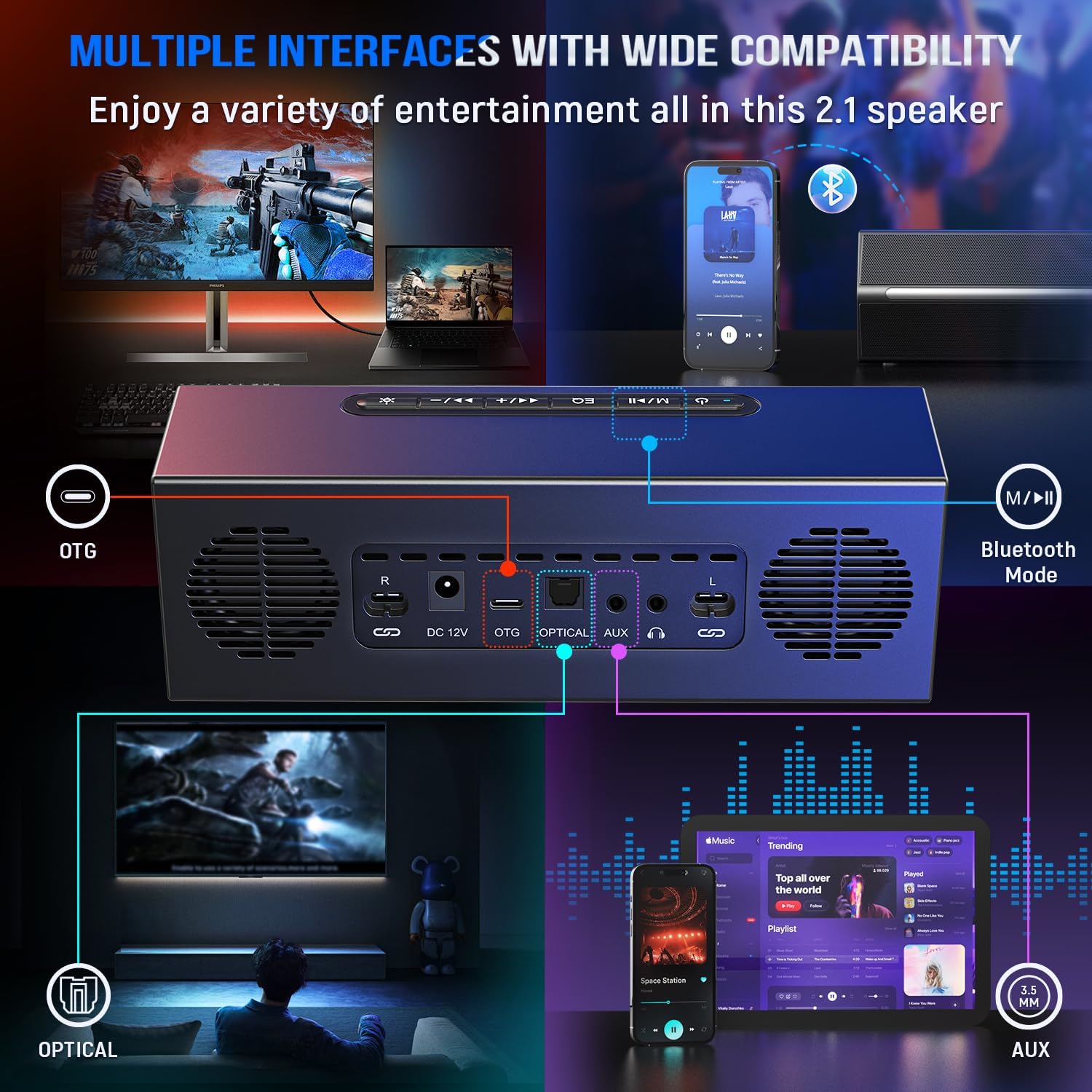
This brings me to the mode switch/mute button. The Ampligame boasts a pretty impressive number of connection options, and this is where I realized that the speakers could do a bit more than just serve as a quick PC audio upgrade.
Long story short, the soundbar in the small den where my kids and I spend most of our gaming/TV time on the weekends recently started acting up. And while I hate the native audio from wall-mounted flatscreen televisions (which inevitably funnel sound straight into the supporting wall instead of forward and out into the viewing space), we’d just been putting up with it until I picked up a new soundbar.
However, since the A22 sported such an interesting array of outputs, I decided to unplug everything and deposit it in this adjoining room—and, wow, what a difference a subwoofer makes!
After plugging the speakers in, I connected our Amazon Fire TV Stick via Bluetooth. Pairing was super quick using the mode switch (and the A22 gets credit for audibly announcing each connection type as you press), and the Firestick even remembered the device after multiple power cycles. The sound—again, in my preferred movie mode—actually did manage to fill the room at a moderate volume. Moreover, it was just as full and responsive as I’d hoped.

Heartened by this discovery, I decided to try the auxiliary input but found the signal coming from my TV’s available headphone output to be tinny and with a little too much line noise for my liking. However, when I switched the optical input—I had to provide my own optical cable, as there wasn’t one bundled with the speakers—things really came to life.
I booted up my Xbox Series X and started my current obsession, Diablo IV, and was quickly pulled into the game’s cinematic soundtrack and lush ambient audio. Again, I thought the overall balance was superior in movie mode as opposed to the dedicated gaming EQ, but your mileage may vary.
Without an IR remote, companion app, or even HDMI support, the Fifine Ampligame isn’t a seamless audio solution for your television, but in smaller spaces, like, say a meager den or college dorm room, it more than holds up. The Bluetooth and 3.5mm interfaces also make it easily compatible with your mobile phone, but since there’s no internal battery it’s not exactly a portable audio station either.
Still, if you’re looking for a speaker set that excels for desktop gaming but can still, at a stretch, be used in these other environments, the Fifine Ampligame A22 certainly fits the bill. Best of all, this flexibility, not to mention the overall power and clarity of the speakers, is far superior to what you’d likely expect at its $72.99 price point.
Review materials provided by Fifine Microphone. This post contains affiliate links. Yes, I’m a sucker for responsive lighting.